



Testimonials || HDMI Cable FAQs  || View Cart  || UPS Tracking  || USPS Tracking || Shipping Info || Payments || New Products || Clearance


HACKER SAFE certified sites prevent over 99.9% of hacker crime.
CABLES -
HDMI Cables
HDMI Switches
HDMI Extensions
HDMI/DVI Combo
HDMI/DVI Adapters
DVI Cables
Wall Plates
Component/RCA
S-Video
Optical/Toslink
Digital Audio
Analog Audio
Subwoofer
Coax/RG6
Speaker Wire
VGA/Video
Projector

3.5mm Mini Audio
iPod & iPhone
Firewire/1394
Firewire/800/400
USB & USB 2
IDE/Serial ATA
Keyboard/Mouse
KVM Combo
SCSI (All)
Networking
Printer/Serial/Game
Cellphone
HDTV Antennas
Gaming
Power Cords
ACCESSORIES -
HDTV Mounts
Speaker Mounts
Accesories
Surge/Powerbar
Electronics

Visit our Web Partner for GREAT DEALS on Ink Cartridges:
InkMyJets.com
DVI, HDMI, VGA, and "M1" Cables Connection FAQ

The DVI cable standard is one of the most confusing "standards" on the market today.  DVI (digital Video Interface) DVI comes in 5 different flavors.  Some DVI connections (digital) are compatible with HDMI.  Some are compatible with VGA.

If your SOURCE has this connection:
Ex: Cable box, satellite box, PC, or laptop video card
And your MONITOR, TV, or PROJECTOR has this connection:
 
Cable Required for connection:

(Click link to view our products)

This is the most common DVI connection found on 99% of cable and satellite boxes.
 DVI-D  DVI-D Cable*
 DVI-I  DVI-D Cable*
 DVI-A or VGA  DVI-D to VGA Converter Cable
 HDMI  DVI-D to HDMI Combo Cable
 DVI-D Dual Link
 
(Very specialized, such as a Apple Cinema-View)
 DVI-D Cable*
 DVI-"M1"
(Such a some In-Focus, Proxima, Hitachi, and Viewsonic Projectors)
DVI-D Cable*
and
DVI-M1 Adapter
 DVI-D  DVI-D Cable*
 DVI-I  DVI-D Cable*
 DVI-A  DVI-A Cable (No longer available)
 VGA  DVI to VGA Cable
 HDMI  DVI-D to HDMI Combo Cable
 DVI-D  DVI-D Cable*
 DVI-I  DVI-D Cable*
 DVI-A  DVI-A Cable (Not longer available)
 VGA  DVI to VGA Cable
 HDMI  DVI-D to HDMI Combo Cable
(See Footnote Below)
 DVI-D  Not compatible (converter needed)
 DVI-I  DVI-A Cable (Not longer available)
 DVI-A  DVI-A Cable (Not longer available)
 VGA  DVI-I to VGA Cable


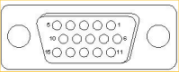
VGA Connector
(Common on most PC's)

 DVI-D  VGA to DVI-D Converter
 HDMI (ie LCD or Plasma)  VGA to DVI-D Converter
 DVI-I  DVI-I to VGA Cable
 DVI-A  DVI-I to VGA Cable
 VGA  VGA Cable


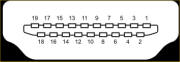
HDMI (Type A) Connector

 DVI-D  DVI-D to HDMI Combo Cable
 DVI-I  DVI-D to HDMI Combo Cable
 VGA  DVI-D to HDMI Combo Cable  and
 DVI-D to VGA Converter Cable
 HDMI  HDMI Cable


HDMI (Type A) Connector

 DVI-M1
(Such a some In-Focus, Proxima, Hitachi, and Viewsonic Projectors)
HDMI Cable
and
HDMI-M1 Adapter

* - Most of My Cable Marts "DVI to DVI" cables are "dual link".  They are suitable for any DVI-D type connection - either single or dual link.mpare our 2

** - DVI-D to HDMI are always "Single Link" as the HDMI specification is only "Single Link"

WHAT IS DVI?

DVI stands for (D)igital (V)ideo (I)nterface.
DVI is a popular form of video interface technology made to maximize the quality of flat panel LCD monitors and modern video graphics cards. It is a replacement for the P&D Plug & Display standard, and a step up from the digital-only DFP format for older flat panels. DVI cables are becoming increasingly popular with video card manufacturers, and most cards nowadays include both a VGA and a DVI output port.

In addition to being used as the standard computer interface, the DVI standard was, for a short while, the digital transfer method of choice for HDTV, EDTV, Plasma Display, and other ultra-high-end video displays for TV, movies, and DVDs. Likewise, even a few top-end DVD players have featured DVI outputs in addition to the high-quality analog Component Video. The digital market is now swinging towards the HDMI interface for high-definition media delivery, and DVI is being again constrained to the computer market.

WHAT ARE THE DVI FORMATS ?

There are three types of DVI connections: DVI-Digital, DVI-Analog, and DVI-Integrated (Digital & Analog):

DVI-D - True Digital Video
DVI-D cables are used for direct digital connections between source video (namely, video cards) and digital LCD (or rare CRT) monitors. This provides a faster, higher-quality image than with analog, due to the nature of the digital format. All video cards initially produce a digital video signal, which is converted into analog at the VGA output. The analog signal travels to the monitor and is re-converted back into a digital signal. DVI-D eliminates the analog conversion process and improves the connection between source and display.

DVI-A - High-Res Analog
DVI-A cables are used to carry a DVI signal to an analog display, such as a CRT monitor or budget LCD. The most common use of DVI-A is connecting to a VGA device, since DVI-A and VGA carry the same signal. There is some quality loss involved in the digital to analog conversion, which is why a digital signal is recommended whenever possible.

DVI-I - The Best of Both Worlds
DVI-I cables are integrated cables which are capable of transmitting either a digital-to-digital signal or an analog-to-analog signal. This makes it a more versatile cable, being usable in either digital or analog situations.  Like any other format, DVI digital and analog formats are non-interchangeable. This means that a DVI-D cable will not work on an analog system, nor a DVI-A on a digital system. To connect an analog source to a digital display, you'll need a VGA to DVI-D electronic convertor; to connect a digital output to an analog monitor, you'll need to use a DVI-D to VGA convertor.

WHAT ARE SINGLE AND DUAL LINKS ?

The Digital formats are available in DVI-D Single-Link and Dual-Link as well as DVI-I Single-Link and Dual-Link format connectors. These DVI cables send information using a digital information format called TMDS (transition minimized differential signaling). Single link cables use one TMDS 165Mhz transmitter, while dual links use two. The dual link DVI pins effectively double the power of transmission and provide an increase of speed and signal quality; i.e. a DVI single link 60-Hz LCD can display a resolution of 1920 x 1200, while a DVI dual link can display a resolution of 2560 x 1600.

HOW FAR IS THE DVI MAXIMUM LENGTH?

The official DVI specification mandates that all DVI equipment must maintain a signal at 5 meters (16 feet) in length. But many manufacturers are putting out much stronger cards and bigger monitors, so the maximum length possible is never exact.

Although the mandated DVI spec is 5 meters, we do carry cables up to 25 feet, and have successfully extended them even longer than that (although results do vary depending on hardware). For guaranteed signal quality on long runs, you should consider using a powered DVI signal booster.

Despite common belief, there is such thing as signal loss in digital pictures. When a DVI run is unstable, you may see artifacts and "stuck" pixels on your display; further degradation tends to flicker out or shake, and the ultimate sign of loss is a blank display. In-house tests on varying equipment have produced strong signals up to 9 and 10 meters long. Tests at 12 meters generally resulted in signal loss and an unusable image on the display, and anything longer rendered no image at all.

Keep in mind that when using DVI-I cables at extensive lengths, you may not be seeing a digitally-clear image on your screen. Because analog has a much longer run, your display may auto-switch once the digital signal is too weak. For this reason, long runs are best done with VGA (for analog) or HDMI (for digital). If you have no option other than DVI, make sure you're getting the best image by using DVI-D cables and verifying that your display is set to digital input.

HOW DO I KNOW WHICH CABLE TO USE?

Determining which type of DVI cable to use for your products is critical in getting the right cable the first time. Check both of the female DVI plugs to determine what signals they are compatible with.

  • If one or both connections are DVI-D, you need a DVI-D cable.

  • If one or both connections are DVI-A, you need a DVI-A cable.

  • If one connection is DVI and the other is VGA, and the DVI is analog-compatible, you need a DVI to VGA cable or a DVI/VGA adaptor.

  • If both connections are DVI-I, you may use any DVI cable, but a DVI-I cable is recommended.

  • If one connection is analog and the other connection is digital, there is no way to connect them with a single cable. You'll have to use an electronic convertor box, available in either analog VGA to digital DVI or digital DVI to analog VGA.

HOW TO RECOGNIZE A DVI CABLE?

There are two variables in every DVI connector, and each represents one characteristic.
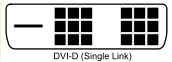
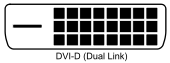
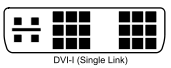
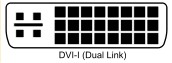
The flat pin on one side denotes whether the cable is digital or analog:

  • A flat pin with four surrounding pins is either DVI-I or DVI-A

  • A flat pin alone denotes DVI-D

  • The pinsets vary depending on whether the cable is single-link, dual-link, or analog:

  • Two separated 9-pin sets (rows of 6) for a single-link cable

  • A solid 24-pin set (rows of 8) for a dual-link cable

  • A separated 8-pin and 4-pin set is for DVI-A.